
A digital day planner. Seven days, one page, no account.
Free to use on one device. Works offline.
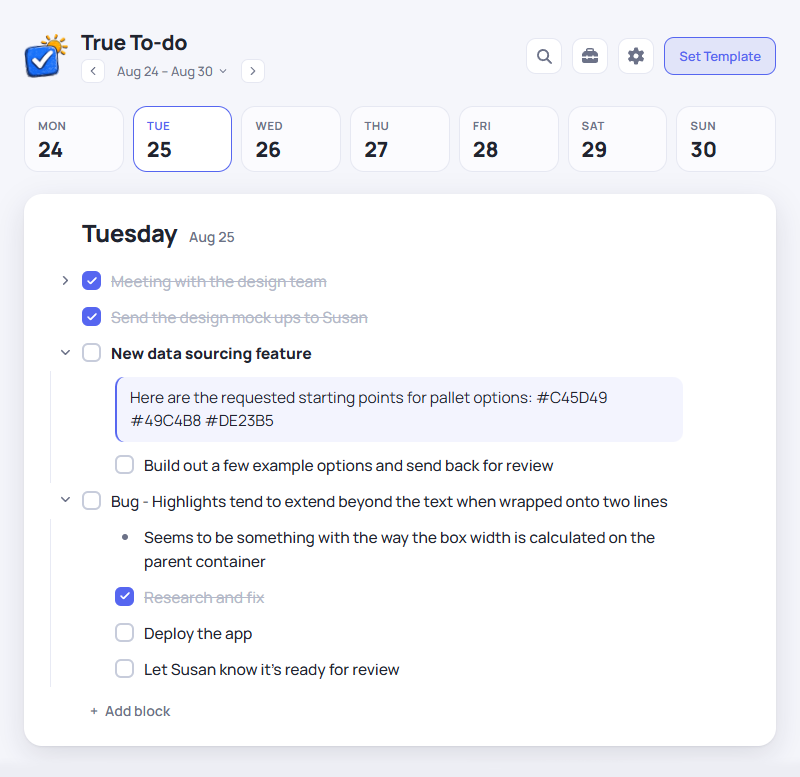
Monday to Sunday on one page
Give each day its own list. See what's planned for the week, and look back at past weeks when you need to.
Keep a template for each weekday
Give each weekday its own template. The recurring parts of Tuesday, like your daily email cleanup and the 4pm client check-in, are already there when the week turns over. You only type what is new.
Break tasks into subtasks
Add as many levels of subtasks as you need. Nest a bug under its feature, add a note or a code snippet, then collapse the list when you're done.
On the free tier, your week never leaves your browser
Your weeks are saved in your browser, with no account needed. The app installs to your device and keeps working with the wifi off. Pro adds sync and cloud backup.
The app is free to use. Pro adds sync.
Auto-renews at $29/year (or $4/month) until cancelled. Cancel any time in your account settings. 30-day no-questions refund on your first Pro purchase. See terms for details.
Questions
Is the free version a trial?+
No. The free tier has no time limit and doesn't require payment. The features listed under Free stay free. Pro adds sync and cloud backup.
Where is my data stored?+
On the free tier, your weeks stay in your browser on the device you're using. With Pro, they're also stored on our servers so you can sync them across devices.
Can I use it on my phone and laptop?+
You can install it on both. On the free tier, each device keeps its own weeks. Pro syncs changes between your phone and laptop when they're online.
Does it work offline?+
Yes. After the first visit it loads and saves without a connection, including in airplane mode.
Can I lose my weeks?+
Yes. On the free tier, your weeks are saved only in your browser. Clearing its storage can delete them, and browsers may also remove data from sites you haven't used recently. Installing the app can help it keep your data. Use Tools → Export to save a backup file. Pro keeps a cloud copy of your synced weeks, which you can access if you lose a device or clear its browser storage.
Start with this week.
The free app opens in a browser tab with nothing to sign up for. Add Pro whenever you want the same week on every device.